

Welcome To The NativeMirror Photo Submission Tutorial
The purpose of this Tutorial
This tutorial is an easy step on the way to becoming a NativeMirror contributor. It will help you prepare strong, discoverable photographs that meet our collection standards. A short quiz at the end will help you remember the key points.
Photograph Metadata
Good metadata helps customers discover your photography and understand the story behind it.
Titling Your Photograph
Use a clear, specific title that identifies the subject, place or idea. For example, “Cathedral Rock at Paria Bay” is more useful than “Beautiful Beach Photo.”
Photo Story / Description
This is your opportunity to create a connection between the photograph and the viewer. Rather than simply describing what can already be seen, share the story behind the image - an interesting occurrence, personal experience, memory, cultural insight or moment that gives it meaning. The story may reveal something the photograph cannot show on its own. Keep it authentic, engaging and relevant.
Keywording
Add accurate keywords for the subject, location, activity, culture, event and other details customers may search for. Specific Caribbean place names and cultural terms are especially useful. Avoid unrelated or repetitive keywords.
AI-Assisted Metadata
NativeMirror may suggest tags using AI-assisted tools. Review them and add local, cultural or contextual details that automated tools may miss.
Example of how metadata comes together
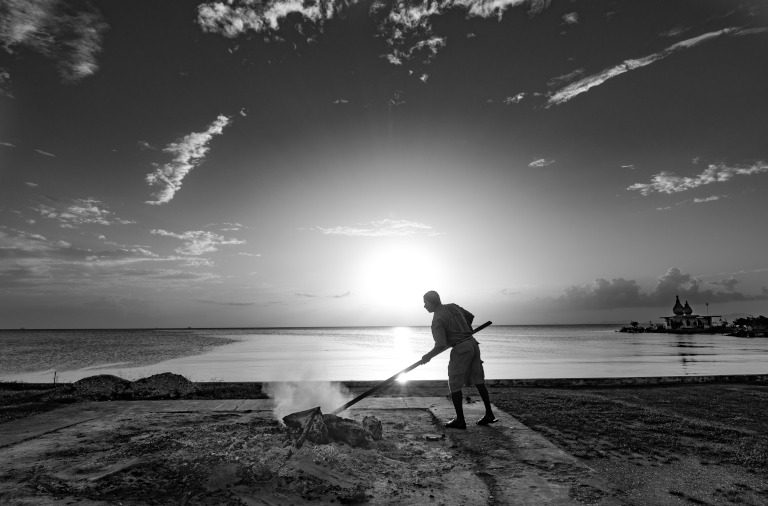
All Days come to an End
Photo Story
Keywords
Photographer Eligibility & Setup
Covers the basic requirements for building your NativeMirror photography portfolio.
1. Minimum Portfolio
Please submit and maintain at least five (5) photographs. There is no set maximum, and we encourage you to grow a strong, varied portfolio over time.
2. Own Your Work
Only submit photographs you created or for which you control the necessary rights. Do not upload another photographer’s work, even if you have edited it.
Image Quality & File Preparation
Strong source files give customers more options and help your photography look its best.
1. File Size & Resolution
Photographs must be at least 4 megapixels (MP) and may be up to 50 MB. Upload the highest-quality original file available, especially if you want the image to be suitable for prints. Do not enlarge a small image simply to meet the minimum.
2. Focus, Exposure & Colour
Images should be intentionally sharp, well exposed and cleanly edited. Avoid accidental blur, excessive noise, heavy compression, poor colour or extreme processing unless clearly part of the creative intent.
3. Composition & Content
Choose photographs with a clear subject, strong composition and visual or storytelling value. We especially welcome distinctive images of Caribbean people, places, culture, architecture, food, nature, events and everyday life.
Licensing, Prints & Earnings
Choose how each photograph can be used and, where available, whether it can also be purchased as a print.
1. Digital Licensing
Photographs may be offered under Editorial, Standard Commercial and eligible Premium Campaign licences. Choose options that suit the photograph and the rights you have available.
2. Prints
Where print sales are enabled, select the available print option on the submission form. Higher-resolution originals provide greater flexibility for print sizes.
3. NativeMirror Only & Exclusive Licensing
Select “NativeMirror Only Listing (Earn +65% more)” only when you can make that commitment. Where available, “Offer Exclusive Content Licensing” allows qualifying Premium Campaign licences to be offered with exclusivity.
4. Your Earnings
Your payout depends on the licence or product sold and whether your photograph is listed on a NativeMirror-only or non-exclusive basis. The submission form will show the applicable pricing and earning options.
People, Property & Releases
Releases help determine whether a photograph can be licensed commercially or is better suited to Editorial use.
1. Recognisable People
For commercial licensing, a model release is generally required for each recognisable person. For minors, a parent or legal guardian must complete the release.
2. Property & Creative Works
A property release or permission may be needed for identifiable private property, interiors, artwork or other protected creative works.
3. No Release?
An image without the releases needed for commercial use may still be suitable for Editorial licensing. Provide accurate information and choose the appropriate use.
Copyright, Logos & Responsible Submission
A quick rights check before uploading can prevent most problems.
1. Copyright
You should be the photographer or otherwise control the rights needed to submit and license the image.
2. Logos & Protected Material
Recognisable logos, trademarks, advertisements, artwork and other protected material can restrict commercial licensing and may make an image more appropriate for Editorial use.
3. Legal Requirements
Repeated submission of content that infringes copyright or other rights may result in contributor account action.
Before You Submit
Take a final look:
Five Key Things to Remember
- Submit photography you created and have the right to license.
- Choose strong Caribbean-focused images with visual or storytelling value.
- Upload your best-quality file: minimum 4 MP and maximum 50 MB.
- Use accurate metadata and a compelling Photo Story / Description.
- Match your releases and licensing choices to the content of the photograph.
Not every submission will be accepted, and that is part of building a strong collection. Use any feedback to strengthen your next submission. We look forward to seeing the Caribbean through your lens.
